






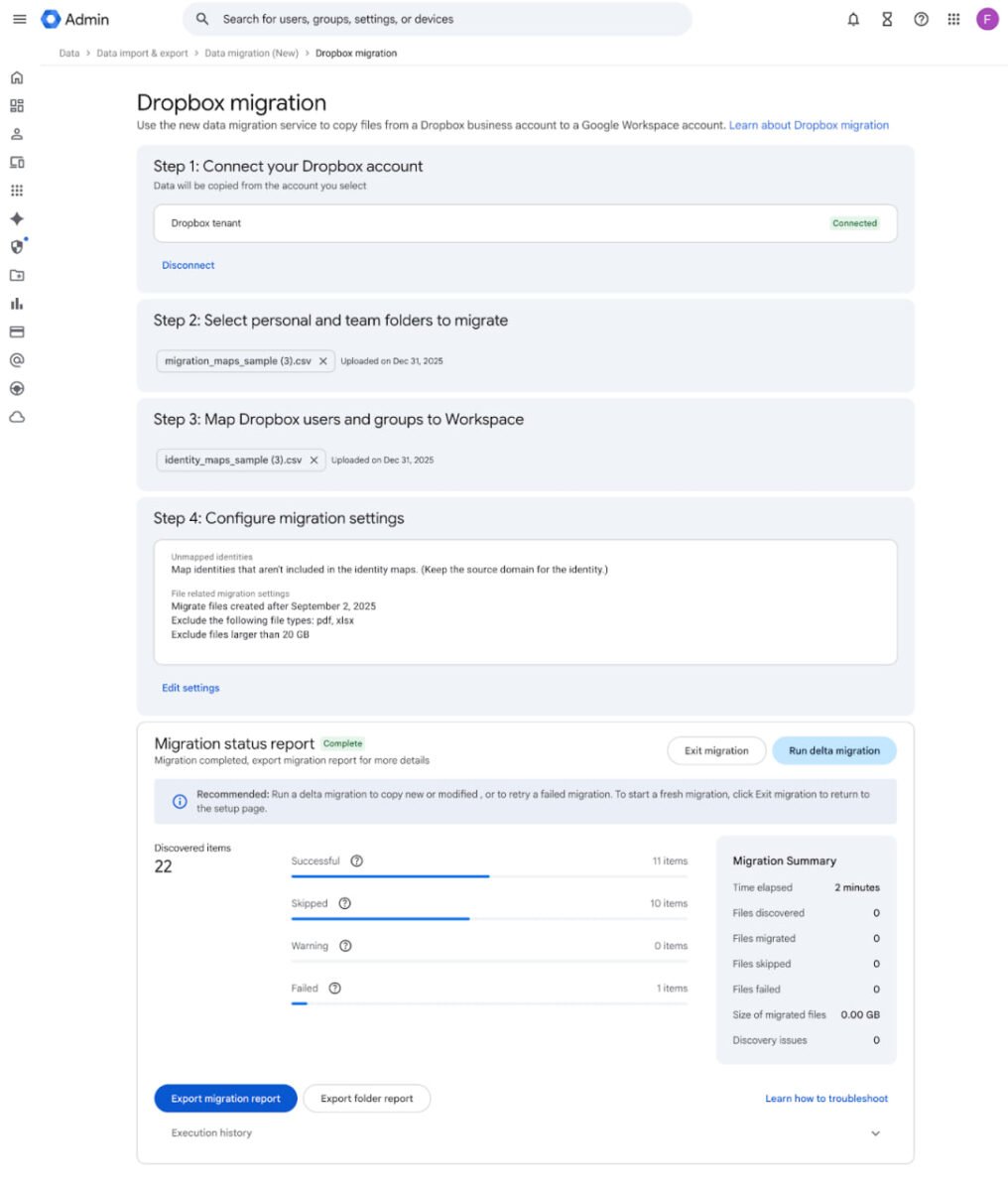
Google has rolled out a long-requested feature for organizations looking to consolidate cloud storage. Google Workspace now lets admins migrate files, folders, and permissions directly from Dropbox into Google Drive using its New Data Migration service.
The capability exits open beta this week and is generally available across most Workspace plans. The goal is straightforward: reduce the friction of switching storage platforms by handling structure, access, and ongoing changes without third-party tools or disruptive cutovers.

A purpose-built path for Dropbox Business
This is not a basic export-and-import workflow. The New Data Migration service is designed for Dropbox Business accounts and preserves existing folder hierarchies and sharing permissions during the transfer. When the data lands in Google Drive, either in users’ My Drive or in Shared Drives, access controls remain intact, minimizing confusion for end users.
Admins can run migrations in batches, with support for up to 150 Dropbox users or team folders at a time. That staged approach allows IT teams to move departments gradually, verify results, and address exceptions before expanding the scope. It also fits organizations that want to standardize Drive usage as part of the move, rather than copying everything wholesale and cleaning up later.
Reporting that shows exactly what happened
Visibility is one of the strongest parts of the new service. Google provides detailed, real-time reporting that tracks which files migrated successfully and which were skipped. Those reports can be exported for auditing or troubleshooting-useful for large environments where data integrity and accountability matter.
Skipped items are identified clearly, which helps admins address permission conflicts, unsupported items, or naming issues without guesswork. For enterprises and education customers, this level of transparency reduces the risk typically associated with storage migrations.
Delta updates minimize downtime
Google also added support for “delta” migrations. In practice, this allows an organization to run an initial transfer, keep working in Dropbox during the transition, and then perform a follow-up pass that captures only files changed since the first run.
This avoids the freeze period many teams face when switching platforms. Instead of pausing work or enforcing a hard cutover, admins can migrate in parallel and close the gap with a final delta sync. For active teams, this is often the difference between a smooth transition and weeks of complaints.
Broad availability across Workspace plans
The Dropbox migration feature is available to a wide range of Workspace customers, including Business Starter through Business Plus, all Enterprise tiers, Education editions, and Nonprofit accounts. That coverage suggests Google views this as a core platform capability rather than an upsell.
Super Admins can access the tool in the Admin console under Menu ? Data ? Data import & export ? Data Migration (New). Older migration tools remain available for legacy scenarios, but Google is clearly steering admins toward the newer service for modern, high-fidelity transfers.
Why this matters beyond convenience
Storage migrations are rarely blocked by file size alone. The real pain comes from permissions, shared ownership, and ongoing collaboration. By handling those elements natively, Google lowers the barrier for organizations that want to standardize on Drive without months of prep work.
This also reflects a broader Workspace strategy. Google continues to position Drive as the central layer for collaboration, with Docs, Sheets, Meet, and third-party tools built around it. Reducing reliance on external migration utilities makes Workspace more self-contained and easier to adopt at scale.
For teams already weighing a move away from Dropbox, the timing is notable. A built-in, permission-aware migration path removes much of the technical risk that previously required consultants or specialized software.
What it does not do
The tool is focused on Dropbox Business. Personal Dropbox accounts and edge cases outside supported configurations may still require alternative approaches. Google has also not positioned this as a bidirectional sync; once migrated, Drive becomes the destination platform.
That limitation is expected. The service is designed to help organizations move forward, not maintain parallel storage indefinitely.
A practical step toward consolidation
Google Workspace has long competed on collaboration features. With this update, it removes another practical obstacle to consolidation. The ability to migrate data cleanly, preserve access, and keep teams working during the transition is often what determines whether a platform switch actually happens.
For organizations looking to simplify their cloud stack in 2026, a native path from Dropbox to Drive makes that decision easier to execute.
Thank you for being a Ghacks reader. The post Google Workspace Now Supports Direct Dropbox-To-Drive Migrations appeared first on gHacks Technology News.